One idea. Many possibilities.
Create images and videos with the Flow models available to your account. Start with a prompt, frames or reference ingredients.

You bring the idea. Your local AI agent turns it into creative work. For office teams and people who use AI, not write code.
New worlds Ideas take shape
 Human stories
 Fresh perspectives
 Claude CodeClaude
 Cursor
 Codex
 GitHub Copilot
 Google Antigravity
 Lovable
 Hermes Agent
 OpenClaw
 OpenCode
 LM Studio
 n8n
 Cline
 Warp
 Gemini CLI
 Grok CLI
 Manus
 WindsurfChatGPT
Same-machine clients use local MCP/REST; Lovable, ChatGPT and cloud clients do not yet connect directly. No affiliation or certification implied.
Prepare a presentation visual, a product story or a social clip. Give your local agent the brief, then review the work in one studio.
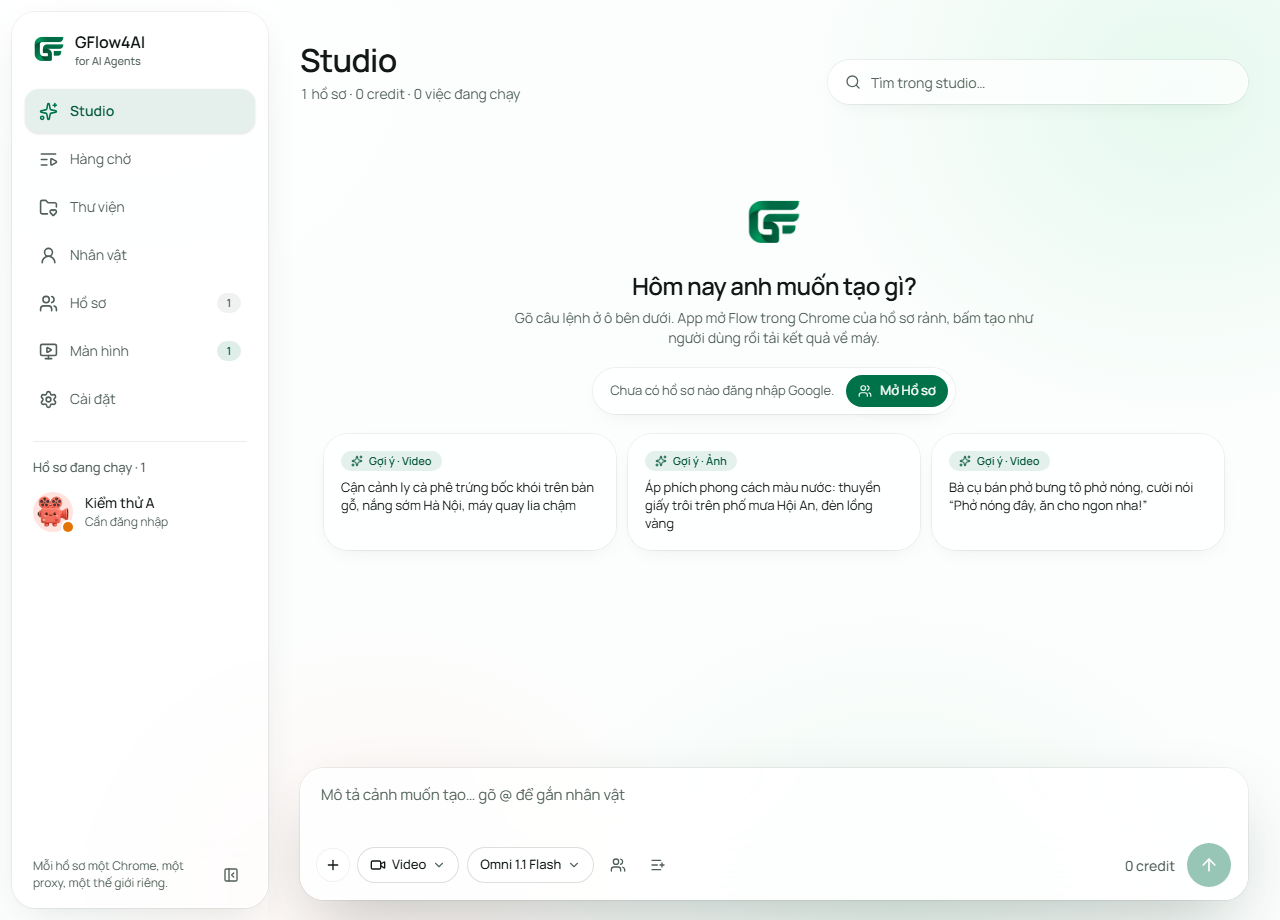
Captured directly from the Windows app with test profiles and content, not a reconstructed interface.
Create images and videos with the Flow models available to your account. Start with a prompt, frames or reference ingredients.
Batch your prompts. Rotate across eligible profiles, track progress and bring downloaded results into one local library.
Each Google profile has its own real Chrome session and optional proxy. View and control the browser from the app.
Keep original character images and voice selections on your machine. The app creates profile-specific Flow bindings when needed.
After Flow accepts supported video jobs, optionally close Chrome while the app reads progress and downloads results. Keep-open remains the default.
Optional local MCP and REST access shares the same durable queue, ownership checks and protection against duplicate submission.
Turn your own product references into concepts, scene variations and short visual stories.
Explore a world, test a shot and build a local library of scenes for your film.
Plan a short series, queue variations and choose the takes that fit your story.
Local MCP and REST, connected to the same queue as the app. No hosted agent gateway needs your Google session.
Use Claude Code on your Windows machine to turn ideas into queued creative work.
Plan your content with Claude. Direct cloud-to-desktop connection is not available.
Use Cursor on your Windows machine to turn ideas into queued creative work.
Use Codex on your Windows machine to turn ideas into queued creative work.
Use GitHub Copilot on your Windows machine to turn ideas into queued creative work.
Use Google Antigravity on your Windows machine to turn ideas into queued creative work.
Plan your content with Lovable. Direct cloud-to-desktop connection is not available.
Use Hermes Agent on your Windows machine to turn ideas into queued creative work.
Use OpenClaw on your Windows machine to turn ideas into queued creative work.
Use OpenCode on your Windows machine to turn ideas into queued creative work.
Use LM Studio on your Windows machine to turn ideas into queued creative work.
Use n8n on your Windows machine to turn ideas into queued creative work.
Use Cline on your Windows machine to turn ideas into queued creative work.
Use Warp on your Windows machine to turn ideas into queued creative work.
Use Gemini CLI on your Windows machine to turn ideas into queued creative work.
Use Grok CLI on your Windows machine to turn ideas into queued creative work.
Plan your content with Manus. Direct cloud-to-desktop connection is not available.
Use Windsurf on your Windows machine to turn ideas into queued creative work.
Plan your content with ChatGPT. Direct cloud-to-desktop connection is not available.